Tag: how-to

  • Six easy tips to keep your laptop cool and prevent overheating  

    Six easy tips to keep your laptop cool and prevent overheating  

    Overheating in laptops is pretty common, and many laptop owners have experienced it. Sometimes aging laptops may be overheating due to internal hardware problems that most people may not be able to fix.

    However, the most common type of overheating is caused by lack of adequate airflow within the machine. Overheating can cause your laptop to slow down, crash, or even suffer permanent damage. 

    If you want to keep your laptop running cool and healthy, there are a few things you can do: 

    1. Use your laptop on a flat surface. This will help to ensure that the air vents on the bottom of your laptop are not blocked. 
    1. Elevate your laptop. If you’re using your laptop on a soft surface, such as a bed or your lap, the air vents may be getting blocked. To improve airflow, try placing your laptop on a book or a lap desk. 
    1. Invest in a laptop cooling pad. Laptop cooling pads use fans to help draw heat away from your laptop. If you use your laptop for demanding tasks, such as gaming or video editing, a laptop cooling pad can be a great way to prevent overheating. 
    1. Clean your laptop’s vents regularly. Over time, dust and debris can build up in your laptop’s vents, blocking airflow. To clean your laptop’s vents, you can use a can of compressed air or a vacuum cleaner with a soft brush attachment. 
    1. Monitor your laptop’s temperature. There are a number of different programs that you can use to monitor your laptop’s temperature. If you notice that your laptop is getting too hot, you can take steps to cool it down, such as closing unnecessary programs or taking a break from using your laptop. 
    1. Keep your laptop’s software up to date. Software updates often include performance improvements and bug fixes that can help to reduce overheating. 

    If you’ve tried all of the above tips and your laptop is still overheating, there may be a problem with the hardware. In this case, you may need to take your laptop to a qualified technician to have it repaired. 

    Here are some additional tips to help you prevent your laptop from overheating: 

    • Avoid using your laptop in hot environments
    • Close any programs that you’re not using
    • Reduce the brightness of your laptop’s screen
    • Put your laptop on sleep mode when you’re not using it
    • Don’t overclock your laptop

    By following these tips, you can help to keep your laptop running cool and healthy for many years to come. 

    Why is it important to prevent laptop overheating? 

    Overheating can cause a number of problems for your laptop, including: 

    • Reduced performance: When your laptop overheats, it will throttle its performance in order to protect itself from damage. This can lead to slower performance and lag. 
    • Crashes: If your laptop overheats too much, it may crash or even shut down completely. 
    • Permanent damage: Over time, overheating can damage your laptop’s internal components. This can lead to costly repairs or even replacement. 

    By taking steps to prevent overheating, you can help to keep your laptop running smoothly and efficiently for longer. 

  • How to use familiar language with children to tell them about good and bad touch

    How to use familiar language with children to tell them about good and bad touch

    It seems that instances of child molestation and sexual abuse will never end.

    An 8 year girl in Islamabad was sexually assaulted in Shahzad Town area on Friday. The rapist managed to escape from the crime scene, in the presence of area residents.

    This should worry us all. As parents, as guardians, as relatives and as friends of people who have baby girls, who we dote on, we should all be alarmed.
    When discussing the topic of good touch and bad touch with your minor kids, it’s important to approach the conversation in a gentle and age-appropriate manner. Here are some suggestions on how to have a soft and conversational discussion:

    Choose an appropriate time and setting

    Find a calm and comfortable environment where your children feel at ease and can focus on the conversation without distractions.

    Use simple and understandable language:

    Adapt your language to the age of your children. Use words and phrases that they can easily understand and relate to. Avoid using complex or scary terms.

    Start with positive touches:

    Begin the conversation by talking about different types of touches that are generally considered good or positive. For example, you can mention hugs from family members, holding hands with friends, or receiving a pat on the back.

    Define personal boundaries

    Explain to your children that their bodies are their own and that they have the right to decide who can touch them and how. Teach them to recognize and trust their instincts when they feel uncomfortable with a touch or a situation.

    Introduce the concept of bad touches

    In a calm and reassuring manner, explain that there are certain touches that are not appropriate or safe. Emphasize that no one should touch their private parts (parts covered by a swimsuit) except for medical reasons and only in the presence of a trusted adult, like a doctor or parent.

    Encourage open communication

    Let your children know that they can always come to you or another trusted adult to talk about any uncomfortable experiences or if they have any questions. Assure them that they won’t get in trouble for speaking up and that you are there to support and protect them.

    Role-play and practice scenarios

    Engage in role-playing activities where you and your children can practice different scenarios. Teach them to say “no” assertively and to seek help from a trusted adult if they encounter an uncomfortable touch.

    Reinforce the message over time

    Remember that this conversation is not a one-time event. As your children grow and develop, it’s important to reinforce the message regularly and adapt the conversation to their increasing understanding.

    Use age-appropriate resources

    Consider using age-appropriate books, videos, or online resources that discuss the topic of good touch and bad touch in a child-friendly manner. These resources can complement your conversation and help reinforce the concepts.

    Remember, the goal is to create a safe and open space for your children to ask questions and understand the importance of boundaries and consent.

  • Easiest way to sign up and sell products on Daraz

    Easiest way to sign up and sell products on Daraz

    Many small to large businesses are now listed on Daraz and are generating great earnings.

    There is no doubt that online enterprises will play a significant role in Pakistan’s future as the globe continues to move toward a digital economy.

    You can now experience what it’s like to work with the world’s top online commerce technology and logistics company, thanks to Daraz’s acquisition by the Alibaba Group, which makes it simple to grow your business from the comfort of your home.

    Surprisingly, joining Pakistan’s largest online marketplace is not that difficult.

    All small to medium-sized businesses can open stores on Daraz with dedicated one-on-one support, where sellers can get free business advice any time of day or night! Additionally, merchants will have free analytics tools at their disposal to aid in the optimization of their online business.

    On its official website, Daraz claims to have initiatives that reduce financial burdens by offering 0% commission. From May 1 through June 30, all newly registered and existing vendors are exempt from paying commission fees. Additionally, sellers can enjoy free pick-up and storage, promotional credits, and discounted packaging.

    Daraz offers express sign-ups for all new sellers, enabling you to launch your venture and begin selling on the platform in less than two days.

    How to sign-up

    Simply pick up your phone and text “Daraz” space “Name” to 7575 to get started, or you can also sign up as a vendor on the platform’s seller sign-up page.

    If you’re just getting started with your online business, Daraz also provides free training and instruction for online sellers through webinars offered by Daraz.

    According to its website, Daraz is the largest virtual marketplace in South Asia, with more than 20 million products listed in more than 100 categories on both its website and mobile application. The marketplace aims to empower and enable tens of thousands of sellers to interact with millions of customers in this cutting-edge technological era.

  • PC running slow? Here are some easiest fixes

    PC running slow? Here are some easiest fixes

    A slow computer can make life much more difficult than it has to be, whether you’re using it for business or for entertainment. When you can hardly open a window, load a website, or even start up your system, slow performance speed can make your computer worthless.

    Spending a few minutes working through some tried-and-true troubleshooting procedures can make life easier if you’ve recently been experiencing issues.

    The following steps will help your PC perform smoothly:

    Delete unnecessary images or files.

    Sifting through the files and images on your computer might be overwhelming, but by deleting the ones you no longer use, you can speed up the process and prevent your computer from halting or crashing. Clearing out old images, erasing files on desktops, or moving huge files to online backup, are small and sensible methods to help your PC run quicker.

    If the process feels burdensome, break it down and take out 30 minutes each day to delete everything unnecessary. You may quickly identify any temporary files or apps sapping your PC’s storage.

    Get an external SSD/HDD

    If you take a lot of pictures, you might even want to think about external storage, like Portable SSD. It is ideal for safely saving a large number of your necessary high-resolution videos and photographs rapidly.

    Empty Recycle Bin

    Unwanted files will remain in the recycle bin after you have erased them because they are still there. You should routinely empty your recycle bin because it can be taking up space on your computer that could be better used elsewhere.

    The more capacity you have on your hard drive, the better your PC will perform. Your computer will also accumulate temporary files, but you may easily get rid of them. The steps are as follows for Windows 10 and 11:

    1. From the Start menu, select Settings
    2. Go to Storage
    3. Open ‘This PC’ and select the hard drive
    4. Click on Temporary Files
    5. Under Recycle Bin, click Empty Recycle Bin
    6. In Temporary Files, click Delete Temporary Files
    7. Under Downloads, select View Downloads and delete unwanted downloads

    Get more RAM

    You might need to add more RAM if your computer is displaying error warnings and files are taking a long time to load. Although this is distinct from the total amount of storage on your hard drive, adding more RAM will improve your computer’s multitasking abilities.

    Adding RAM can help if you frequently run many programmes at once (opens in a new tab). Installing at least 16GB and 32GB RAM from reputable manufacturers is a good idea. This will help in quicker startups, fewer delays, and smooth app switching.

    Install an anti-virus

    Malware infections can cause a computer to run slower than usual. Additionally, you can have unexpected pop-up warnings, a noisy computer, and erratically starting apps. However, the malware won’t always be so obvious.

    According to Microsoft, running anti-virus and anti-malware software and keeping it updated is the best way to deal with infections and harmful software. For instance, Windows 11 includes Windows Security, which will check your computer for viruses and other harmful software.

    Defragment disk

    In contrast to a solid state drive (SSD), a hard disc drive (HDD) stores data in discrete chunks across the disc. As a result of use and time, relevant data can become dispersed across the entire disc. When you start a software or app, the system then needs more time to locate each piece of data and put it back together for use. Your HDD’s defragmentation can expedite this procedure.

    Click the Windows button or Start menu, choose Control Panel, then System and Security to defragment your hard drive. Defragment your hard drive by selecting it under Administrative Tools.

    Since SSDs use a completely different technology than HDDs, they do not require defragmentation.

    Disable programs that auto-start

    On your computer, certain apps are configured to launch automatically when Windows does. Even though it’s not always simple to know which ones are active, having too many operate concurrently can cause delays.

    In order to prevent start-up apps from starting automatically, you must manually change the settings on your computer.

    Disable constant anti-virus checks

    You may have observed your system performing slowly when Task Manager was open, and that your antivirus programme frequently occupies a position towards the top of the list. While continually scanning your computer for viruses and malware, antivirus software can cause your system to sluggishly operate.

    Read more: 12 important things you need to know before buying a used iPhone

    Schedule your antivirus programme to run at times when you’re not likely to be using your computer, such as overnight or during your lunch break, rather than letting it scan whenever it pleases. Depending on the programme you use, you can modify the scan schedule.

    No matter what model or generation of PC you are using, by following these instructions you can significantly improve your PC’s performance. Unless you’re still on a Core 2 duo.

  • WhatsApp will soon let you hide online status for more privacy

    WhatsApp will soon let you hide online status for more privacy

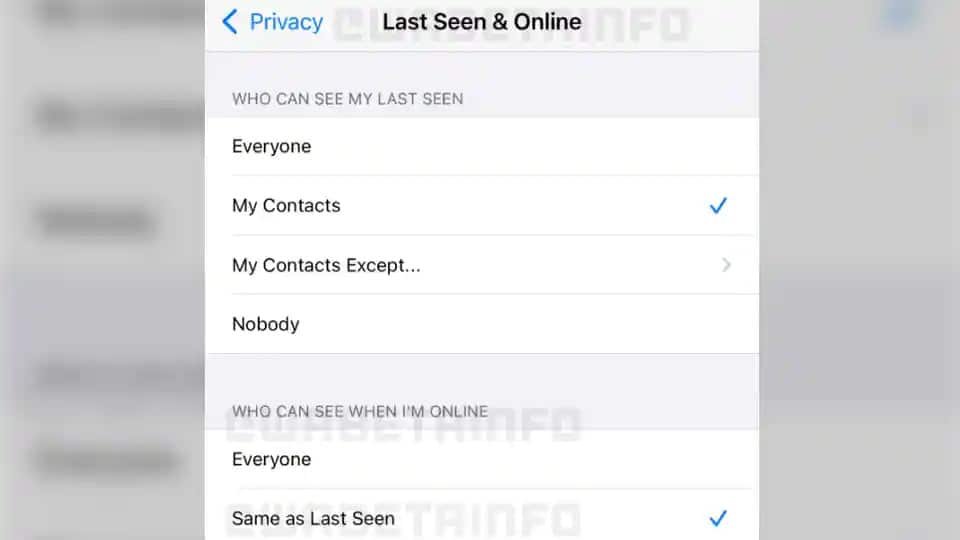
    The Last Seen time in WhatsApp can currently be hidden from the public, but your contacts can still see it when you’re back online.

    It appears that the most popular messenger will soon have the option to hide your online status, which has been long desired.

    You can hide your online status from everyone in WhatsApp’s most recent beta version, according to WABetaInfo. This is fantastic if you’re being chased on WhatsApp and don’t want your bothersome relatives or friends bugging you all the time.

    Over the past few months, the messaging service owned by meta has been testing a tonne of incredible new features.

    You will have two options to choose from with the new feature. You have the option of making your online status public if you want it to function like Last Seen. This means that you have the option of letting anyone see your online activity, just your contacts, just your contacts with a few exceptions, or nobody at all.

    Although the screenshot is of iOS, according to WABetaInfo, WhatsApp is also working on bringing the feature to Android and WhatsApp Desktop.

    It is unknown when the feature will go live because it is still in development.

  • Number of 3G, 4G users in Pakistan increases to 113.89 million

    Number of 3G, 4G users in Pakistan increases to 113.89 million

    The latest data from Pakistan Telecommunication Authority (PTA) reveals that the number of 3G and 4G users grew by 1.14 million from 112.75 million in April 2022 to 113.89 million in May 2022.

    Pakistan’s cellular subscriber base grew by 0.25 million to 193 million by the end of May 2022, up from 192.75 million at the end of April, according to Brecorder.

    By the end of May, cellular mobile teledensity had risen from 87.6 per cent to 87.67 per cent. By the end of May, the total teledensity had risen to 88.81 per cent, up from 88.74 per cent in April.

    The monthly penetration of Next Generation Mobile Services (NGMS) at the end of April had risen to 51.73 per cent, up from 51.24 per cent.

    Network providers

    The total number of 3G users on Jazz fell from 6.222 million at the end of April to 6.068 million at the end of May, a reduction of 0.154 million. By the end of May, the number of Jazz 4G users had risen from 36.567 million to 37.168 million.

    Zong 3G subscribers fell from 3.357 million at the end of April to 3.272 million at the end of May, while 4G users grew from 27.952 million at the end of April to 28.317 million at the end of May.

    Telenor 3G subscribers fell from 3.696 million at the end of April to 3.613 million at the end of May, whereas Telenor 4G users enhanced from 21.216 million at the end of April to 21.494 million at the end of May.

    By the end of May, there were 3.576 million Ufone 3G users, up from 3.673 million at the end of April. Ufone’s 4G users increased from 8.761 million at the end of April to 9.052 million at the end of May, a 0.291 million increase over the previous month.

  • Here are the latest income tax rates and slabs for salaried class

    Here are the latest income tax rates and slabs for salaried class

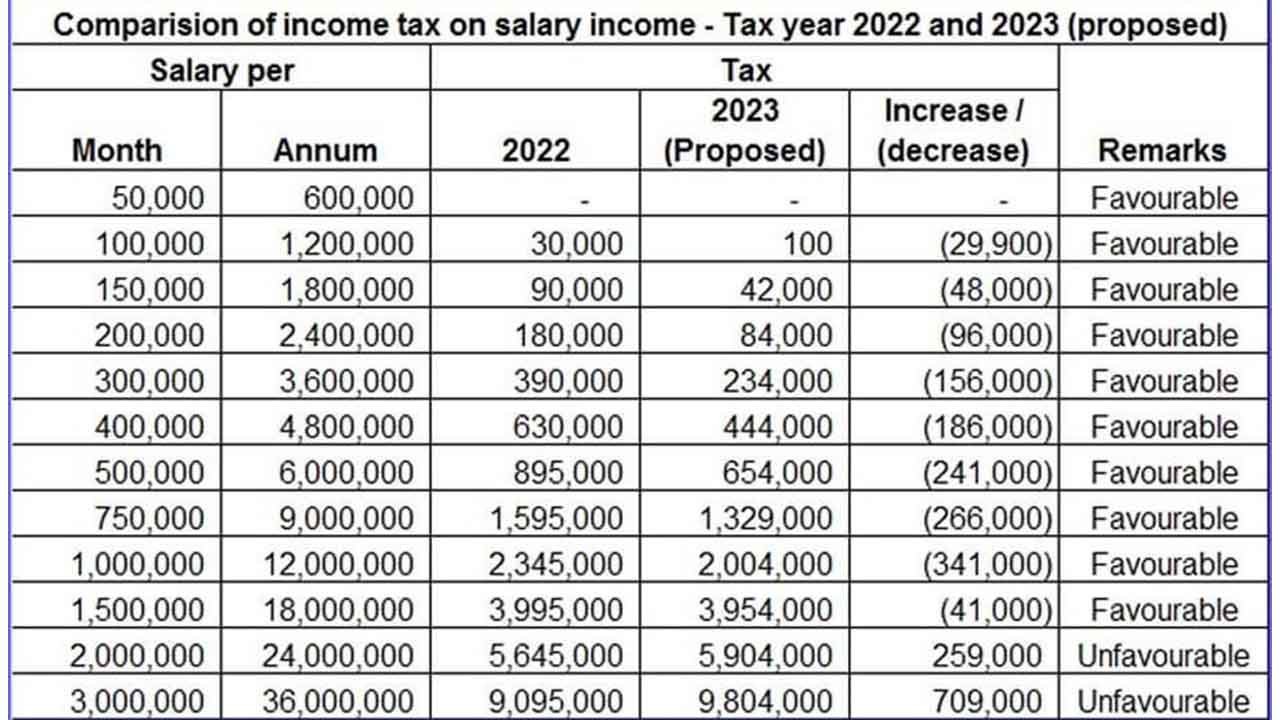
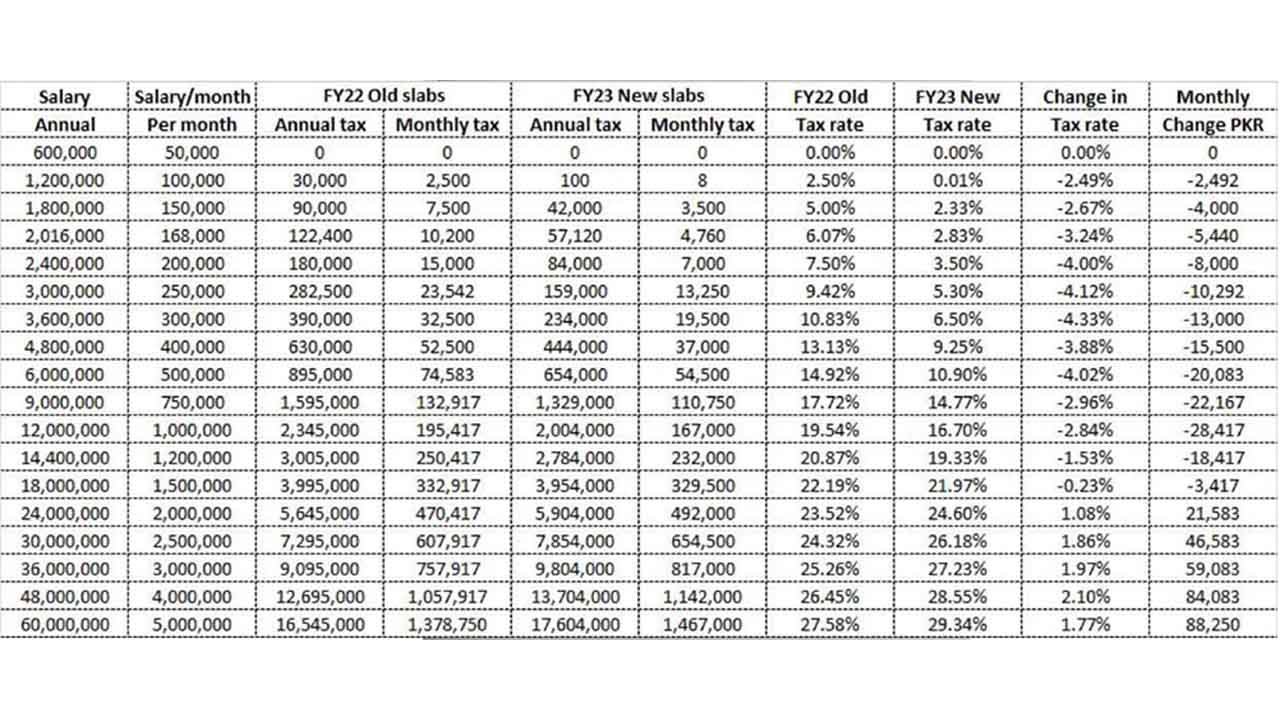
    In the budget for fiscal year 2022-23, the government has exempted those earning up to Rs100,000 per month from paying income tax, up from Rs50,000 last year.

    For the salaried income group, the latest budget is a mishmash as the government reduced tax rates and the number of slabs while eliminating available credit through the omission of deductible allowance for profit on debt and tax credit for investment in shares, health insurance, and pension funds.

    Moreover, the government has released a revamped list of income tax brackets for salaried employees. There were previously 12 slabs, which have now been shrunk to seven.

    Here are the new slabs:

    1. For annual incomes less than Rs600,000 (below Rs50,000 per month)
    2. For a yearly income of Rs600,000-Rs1.2 million (Rs50,000 to Rs100,00 per month).
    3. For annual earnings of Rs1.2m-2.4m (Rs100,000 to Rs200,000 per month)
    4. For annual earnings of Rs2.4m-3.6m (Rs200,000 to Rs300,000 per month)
    5. For earnings of Rs3.6m-6m (Rs300,000 to Rs500,000 per month)
    6. For annual earnings of Rs6m-12m (Rs500,000 to Rs10,00,000 per month)

    For annual earnings of more than $12 million (more than $100,000 per month), income tax is not to be levied on people earning between 0 and Rs600,000 per year (where income from salary exceeds 75 per cent of taxable income). A nominal amount of Rs100 will be subtracted per year from those earning between Rs600,000 and Rs1.2 million.

    Employees getting paid more than Rs1.2 million but less than Rs2.4 million per year will be levied 7 per cent of the amount that exceeds Rs1,200,000 in the third slab.

    An employee getting paid Rs1,400,000 per year will be levied 7 per cent of Rs200,000 (Rs1,400,000 minus Rs1,200,000 since that is the amount exceeding Rs1,200,000).

    As per the latest budget resolution, the government recommended an income tax rate of 20 per cent on small business earnings, 42 per cent on banking, and 29 per cent on related companies.