Tag: Tips

  • Six easy tips to keep your laptop cool and prevent overheating  

    Six easy tips to keep your laptop cool and prevent overheating  

    Overheating in laptops is pretty common, and many laptop owners have experienced it. Sometimes aging laptops may be overheating due to internal hardware problems that most people may not be able to fix.

    However, the most common type of overheating is caused by lack of adequate airflow within the machine. Overheating can cause your laptop to slow down, crash, or even suffer permanent damage. 

    If you want to keep your laptop running cool and healthy, there are a few things you can do: 

    1. Use your laptop on a flat surface. This will help to ensure that the air vents on the bottom of your laptop are not blocked. 
    1. Elevate your laptop. If you’re using your laptop on a soft surface, such as a bed or your lap, the air vents may be getting blocked. To improve airflow, try placing your laptop on a book or a lap desk. 
    1. Invest in a laptop cooling pad. Laptop cooling pads use fans to help draw heat away from your laptop. If you use your laptop for demanding tasks, such as gaming or video editing, a laptop cooling pad can be a great way to prevent overheating. 
    1. Clean your laptop’s vents regularly. Over time, dust and debris can build up in your laptop’s vents, blocking airflow. To clean your laptop’s vents, you can use a can of compressed air or a vacuum cleaner with a soft brush attachment. 
    1. Monitor your laptop’s temperature. There are a number of different programs that you can use to monitor your laptop’s temperature. If you notice that your laptop is getting too hot, you can take steps to cool it down, such as closing unnecessary programs or taking a break from using your laptop. 
    1. Keep your laptop’s software up to date. Software updates often include performance improvements and bug fixes that can help to reduce overheating. 

    If you’ve tried all of the above tips and your laptop is still overheating, there may be a problem with the hardware. In this case, you may need to take your laptop to a qualified technician to have it repaired. 

    Here are some additional tips to help you prevent your laptop from overheating: 

    • Avoid using your laptop in hot environments
    • Close any programs that you’re not using
    • Reduce the brightness of your laptop’s screen
    • Put your laptop on sleep mode when you’re not using it
    • Don’t overclock your laptop

    By following these tips, you can help to keep your laptop running cool and healthy for many years to come. 

    Why is it important to prevent laptop overheating? 

    Overheating can cause a number of problems for your laptop, including: 

    • Reduced performance: When your laptop overheats, it will throttle its performance in order to protect itself from damage. This can lead to slower performance and lag. 
    • Crashes: If your laptop overheats too much, it may crash or even shut down completely. 
    • Permanent damage: Over time, overheating can damage your laptop’s internal components. This can lead to costly repairs or even replacement. 

    By taking steps to prevent overheating, you can help to keep your laptop running smoothly and efficiently for longer. 

  • Eight Googling tips you probably don’t know

    Eight Googling tips you probably don’t know

    We frequently use Google at work and home for research but most of us don’t know how to optimise our Google search.

    A Twitter user shared a few tips that can make our search easy, more precise, and can save time.

    Chris Hladczuk shared a few short keys for Google search. Here are some key tips:

    Quotation marks

    Dashes

    ~ Tilde

    Read More: Five science-oriented tips to deal with work stress

    Site:

    | Vertical bar

    .. Two Periods

    Location:

    Filetype:

  • How to get rid of ‘gosht ki boo’, Ammis tell all

    How to get rid of ‘gosht ki boo’, Ammis tell all

    Eid is almost here and we are all looking forward to yummy meaty dishes. Almost all of our mothers have some secret ingredient or a tip to get rid of the smell of the meat.

    A few members of The Current’s team asked their mothers about totkas that they use to avoid the smell. Here are a few tips by our moms.

    All you need to do is add flour and water to the meat and mix it to coat evenly. Leave it for at least one to two hours. Then wash the meat with normal water.

    One member’s mother told us to wash the meat with lukewarm water and salt to get rid of the smell.

    Another tip is to make vinegar and garlic paste and spread it on the meat evenly. Leave it for 30 minutes and then wash it with water.

  • How to beat the heat without AC

    How to beat the heat without AC

    Summers have officially unleashed their wrath in Pakistan with temperatures soaring leaving people dehydrated and feeling very hot. Not everyone has the option of an air conditioner and even if they do, many might prefer to save some money on your electricity bill or care about the environmental impact. Here are a few suggestions for staying cool, even without AC.

    Stay hydrated

    When you’re hot and exhausted, hydrating yourself is the first and foremost step to cooling down. Try to drink as much water as you can and stay hydrated.

    Take a cold shower using peppermint soap

    You can take your cold shower experience to the next level by using peppermint products. The menthol in peppermint products activates brain receptors that convey whether something you’re eating or feeling is cold. Taking a cold shower generally helps cool your body by lowering your core temperature.

    Read more – Six tips to manage self-isolation anxiety

    Use heat-blocking curtains

    One of the best ways to keep your home cool in the summer is to keep the sun out and give the hot air somewhere to go. One should consider using some heat-blocking curtains or chics to block the heat. Once the temperature starts to get a little cooler outside, open those curtains and let the warm air out. 

    Consume summer drinks

    Drink fresh juices and you can add Tukhm-e-Balanga (Basil Seeds), Gond katira or sattu in your drink to stay cool and hydrated.

    Use the exhaust fan in your kitchen and/or bathroom

    Turn on the exhaust fan in your kitchen to let the hot air out that rises after you cook or in your bathroom to draw out steam after you bath.

  • Tips to beat the toxic smog this winter

    Tips to beat the toxic smog this winter

    The thick blanket of smog is engulfing major cities and other areas. During the bad smoggy days, visibility drops to a few hundred meters, the sun looks like a dull blurry blob, lungs struggle for air while eyes itch and burn. Here are a few tips to deal with those bad days.

    Limit your time spent outdoors

     It’s bad enough that pollution badly affects people’s lungs, it’s even worse that it discourages the outdoor activities. Try to limit your time spent outdoors. Exercise indoor, enjoy food deliveries at home and play indoor games. Enjoy Home Sweet Home!

    Choose the right mask

    It might be difficult to find the right mask but avoid surgical masks as they don’t provide proper respiratory protection. Give masks to your whole household, especially those working outside. You can either buy or order online a better quality mask. Go for the one that filters the maximum amount of finer particles of dust and pollution. 

    Buy an air purifier

    Air purifiers filter out harmful particles, kill germs and removes volatile organic compounds that can harm the lungs, liver or kidneys. They aren’t cheap but worth it in the long run. Smart air canon purifier, Beurer LR 200 and Hextio air purifier are good options to buy an air purifier.

    Read more: Air purifiers that are effective and available

    Go green

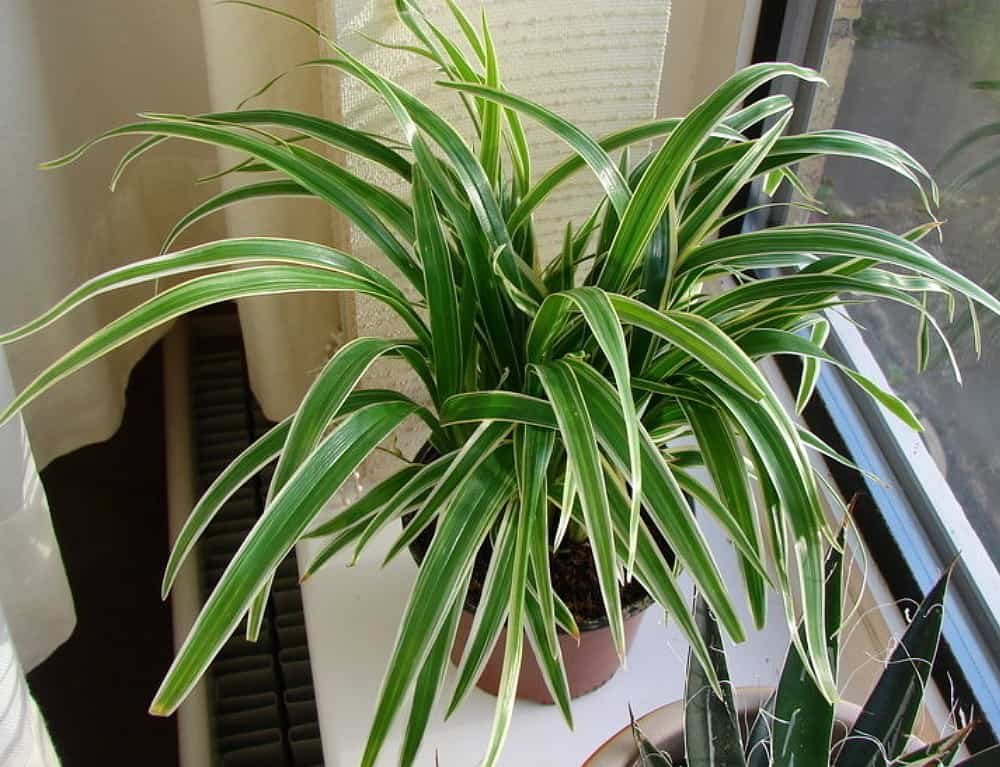
    Make your home a little greener. Bring home some natural air purifiers like aloe vera, and spider plant that can suck all the pollutants. The plants will not only help with the air quality but will also help as a mood refresher.

    Spider Plant
  • How to keep your closet organised

    How to keep your closet organised

    We’ve all been through the never-ending process of trying to keep our cupboards organised. One minute it’s organised, and the next it’s an absolute disaster.

    Here are a few tips to help you keep your cupboard in good shape.

    Stack thick items like jeans and sweaters

    Winters are coming and sweaters tend to occupy a lot of space. The best solution is to stack up the bulky winter wear. These items are thick, so they won’t crinkle or lose their shape when you stack them. Also, you’ll be able to see each item in a stack clearly, making it that much easier to find what you’re looking for.

    Roll T-shirts and pajamas

    Things like cotton shirts, pajamas and even work out clothes can be organized by roll and tuck technique. And put them in your drawer or any storage box. This technique is a major space saver if you do it right. Tuck your rolled clothing into shoe boxes (great for sliding into drawers), or use wire baskets or clear bins (perfect for shelves).

    Hang scarves on hangers

    Sure, you can roll them up or stack them if they’re thick, but tying your scarves on a hanger is a way better option for organizing them. Hanging your scarves keeps them wrinkle-free and easy to see and access.

    Utilize your wall for hanging jewellery and accessories

    Hang accessories like belts, jewelry, hats or
    ties on a wall. You can use nails or towel hooks or opt for a more personalized
    approach like a stylish coat rack.

    Store your most-used clothes at eye level

    Keep everything you wear regularly in the
    middle of your closet at eye level so it’s easy to find. Put lesser-used pieces
    directly above or below your most popular clothes, and relegate your least-worn
    items to the top shelf.

  • Tips to increase your internet speed

    Tips to increase your internet speed

    Internet has become an essential part of our daily life and according to report more than 3 billion people use the internet daily around the world for various reasons including work, research, listen to songs, or to find friends on social media.

    Each user pays a handsome amount to get fast internet connection in their homes and offices, so getting good speed is a very important factor.

    There are virtually countless reasons why your internet might not be performing as you expect it to. A few common reasons are old software or hardware, too many other computers or mobile items on the network, ongoing downloads, signal interference from walls or other appliances and low Internet speed from your service provider.

    The following are some important tips that have proven their effectiveness for increasing internet speed.

    Decrease the distance between your computer and your router 

    If you are connected to the internet via a Wi-Fi router, the internet speed drops as you move further away from your router. Stay as close as possible to your router for maximum internet speed.

    Delete Unnecessary toolbars

    Removal of unused toolbars from your internet browser can speed up your network. You can also increase internet speed by using the browser in turbo mode, which increases the speed of work in the network by almost 10%.

    Unplug your router and modem for a few minutes

    This process is known as “power-cycling”, allowing your router to clear out its internal cache and start from scratch. It will further prompt it to re-select the least busy Wi-Fi channel, which is something that may change daily depending on your location.

    Check your device (PC or mobile) for viruses

    Regular scan of the memory of the computer or mobile device by antivirus programs prevents the risks of leakage of personal information and increases the speed of the Internet.

    Viruses significantly slow down the internet speed, using traffic for their needs.

  • How to deal with work-related back pain

    How to deal with work-related back pain

    Do you feel fatigued, stressed and cranky at the end of the day? Chances are that you are reading this slouched over your desk with your legs crossed or on your way back home after a long week. Most of us spend approximately 8 to 9 hours on our office desks, as a result of which the probability of developing back and neck pain is high. Here are a few tips to avoid back pain.

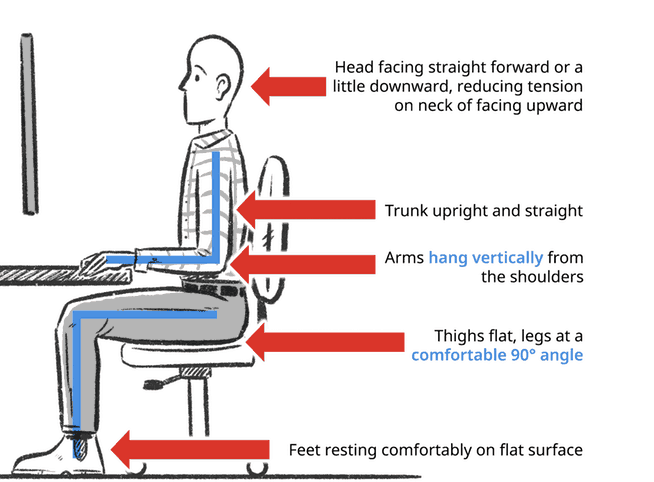
    For a pain-free posture:

    • Keep monitor height in line with your eye level
    • Sit at least one and a half foot away from your computer screen
    • Place your arms on the armrest and vertical from the shoulders
    • Thighs and legs should make a 90 degrees angle
    • Feet should be resting on a flat surface.

    Fix the things on your desk

    Place the keyboard and mouse close to your hands and arms.

    Take short
    breaks

    Getting up at least once an hour for three to five minutes reduces pressure on spinal disks and boosts circulation. Try this out and notice the difference. You will guaranteed feel less stressed.

    Stretch your
    shoulders

    If you have lots of work on your plate, and getting up after every hour is not possible, don’t worry. You can stretch your shoulders while sitting on the desk.

    Don’t put your phone between the ears and neck

    Pinning the phone between your shoulder and ear while you multitask is a natural move but it can result in neck pain. Use earphones or turn on the speaker of your phone during lengthy conversations.